
CertCase for wind technicians
Your career. Your credentials. One profile.
Keep your certificates, experience and availability together in one place. See opportunities, understand what you’re qualified for and show employers you’re ready to work.
Free for technicians
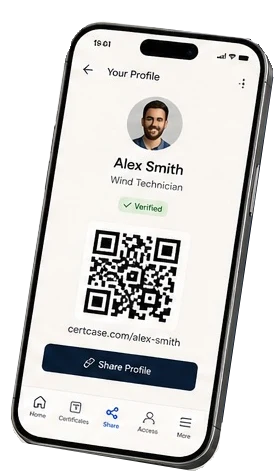
Everything about your work, in one place
Your certificates
Keep your training and certification records together in one place, with expiry dates tracked.
Your experience
Build a record of the projects, roles and experience you have accumulated.
Your availability
Show when you are available for your next project.
Your jobs
Discover relevant opportunities without searching dozens of different websites.
Your readiness
Understand whether you are ready for a role, and what training or certification you are missing.
Your profile
One professional technician profile that grows with your career.
How it works
- 1Create your free profile
- 2Add your certificates and experience
- 3Set your availability
- 4Let CertCase show you opportunities and role readiness
Built for technicians in wind
CertCase is built specifically for technicians working in wind and renewable energy. It gives you ownership of your professional record, and makes it easier to demonstrate your certification, competence, experience and availability — without emailing the same documents over and over again.
Free for technicians.
Creating and maintaining your CertCase technician profile costs you nothing.
What is CertCase for wind turbine technicians?
CertCase is a free certificate wallet and job board for wind turbine technicians. You keep your GWO and other wind tickets in one profile, get reminders before they expire, and find wind jobs that match your certificates — onshore and offshore.
Instead of sending certificate copies to every new employer, you share one profile by link or QR code. You decide who sees it and can stop sharing at any time.
Keep every ticket in date
Add your GWO Basic Safety Training modules — First Aid, Manual Handling, Fire Awareness, Working at Heights and Sea Survival — and your BTT, medicals, HV authorisations and other tickets. Upload a photo or PDF and CertCase reads the certificate name, provider, number and dates for you to check.
CertCase reminds you 90, 30 and 7 days before a certificate expires and on the day, so you can book a GWO refresher before you lose work. Your GWO records stay in WINDA under your WINDA ID as usual; CertCase keeps them alongside everything else.
Know if you are ready for the next role
CertCase checks your profile against role standards such as Wind Turbine Technician, Wind Turbine Service Technician and HV / Electrical Technician. If you target offshore work, offshore items such as Sea Survival and an offshore medical are included. Each missing item comes with a link to add the certificate or find training.
Certificates you upload show as awaiting verification until they are checked, so employers know exactly what has been proven.
Find wind jobs
CertCase collects wind-industry vacancies into one feed, so you do not have to search dozens of sites. Check each job against your own tickets and see what you would need for it.
Questions
Is CertCase really free for technicians?
Yes. Creating and maintaining your technician profile — certificates, experience, availability, role readiness and sharing your profile — costs you nothing.
What certificates can I upload?
Anything you are asked for on site: GWO modules, medicals, offshore survival, trade and electrical tickets, rescue and rope access, site inductions and other training records. You upload a PDF or a photo of the certificate and CertCase reads the details so you can check and confirm them.
Can I add previous projects and experience?
Yes. You can record the projects and sites you have worked on, your role, the turbine platforms you have worked with and the dates, so your experience is a proper record rather than a memory.
Can I update when I'm available for work?
Yes. You set your own availability and rotation pattern, and change it whenever your plans change.
Can employers see my information?
Only when you let them. Your profile is private by default. You share it with a specific client or recruiter through a secure link, and you can withdraw that access at any time. Sensitive personal details such as contact and next-of-kin information stay restricted, and every access is recorded so you can see who looked at what.
Can I delete or change my information?
Yes. Your record belongs to you — you can correct, replace or remove your details and documents, and revoke anyone’s access. Certificates that have expired are shown as expired rather than hidden, so what you share is always honest.
How long does it take to create a profile?
A few minutes to sign up and add your details, then you can upload certificates whenever it suits you — from your phone.
Ready to put your career in one place?
Create your free CertCase technician profile.